
Table of Contents
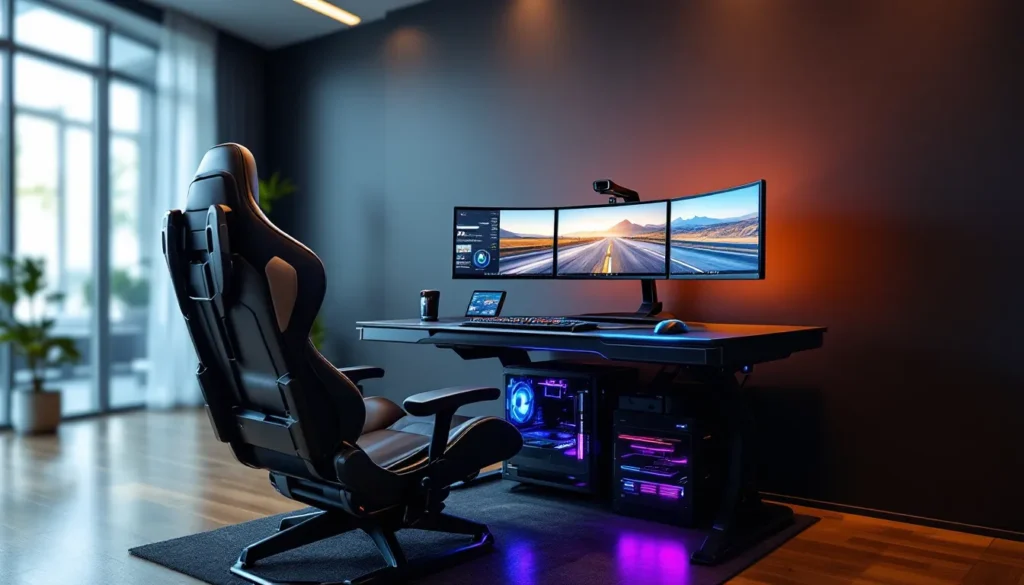
ToggleIf you’ve ever scrolled through high-end gaming setups on Reddit or YouTube, you’ve probably seen them: those wild, wraparound cockpit-style stations that look like they belong on the bridge of a spaceship. That’s the scorpion gaming setup, a zero-gravity style workstation that cocoons you in monitors, suspends your peripherals at perfect angles, and makes traditional desk setups look downright primitive.
These aren’t just show pieces for tech influencers anymore. In 2026, scorpion setups have evolved from niche luxury items into serious contenders for anyone building a dedicated gaming space. With prices ranging from budget DIY rigs to $5,000+ premium workstations, there’s a scorpion configuration for gamers who prioritize immersion, ergonomics, and that undeniable cool factor.
This guide breaks down everything you need to know about scorpion gaming setups, what they are, what you need to build one, how to optimize them for different game types, and whether the investment is worth it for your playstyle.
Key Takeaways
- A scorpion gaming setup is a zero-gravity workstation where you recline in an ergonomic chair while monitors and peripherals are mounted on adjustable arms overhead, reducing spinal pressure and neck strain during long gaming sessions.
- Scorpion gaming setups range from budget DIY rigs under $1,500 to premium workstations exceeding $5,000, with mid-tier options like the Bauhutte ($1,899) and Cluvens ($3,799–$4,599) offering solid value.
- These setups excel for sim racing, flight simulators, and RPGs, but competitive FPS players may experience a 10–15ms reaction time disadvantage due to the reclined position affecting core stability.
- Proper ergonomic configuration requires positioning monitors 24–36 inches away at or slightly below eye level, maintaining keyboard height for 90–110° elbow bend, and selecting a recline angle of 130–145° for active gaming.
- A scorpion gaming setup demands 6′ × 5′ floor space at full recline, 10–15 foot cables for proper routing, and regular maintenance including frame bolt checks, cable inspection, and lubrication of recline mechanisms.
- Consider a mid-tier scorpion gaming setup initially rather than jumping to premium tiers, as these systems have lower resale value (40–60% recovery) and require dedicated space unsuitable for shared gaming environments.
What Is a Scorpion Gaming Setup?
A scorpion gaming setup is a zero-gravity style gaming workstation where the user reclines in an ergonomic chair while monitors, keyboard, mouse, and other peripherals are mounted on adjustable arms around them. The design mimics the posture of a scorpion’s tail, hence the name, with the monitor array curving overhead and the seating position angled back between 120-170 degrees.
Unlike traditional desk setups where you sit upright at 90 degrees, scorpion stations distribute your body weight more evenly, reducing strain on your lower back and neck during marathon gaming sessions. The entire setup is typically built around a central frame that supports everything from triple-monitor arrays to HOTAS controllers for flight sims.
Understanding the Scorpion Chair Gaming Station
The heart of any scorpion setup is the scorpion gaming chair, though “chair” is a bit of a misnomer. These are actually full workstations with integrated frames, monitor mounts, peripheral arms, and recline mechanisms.
Most scorpion chairs feature:
- Adjustable recline angles from 90° (traditional sitting) to 170° (nearly flat)
- Overhead monitor arms that support 1-3 displays, typically in sizes from 24″ to 49″ ultrawides
- Articulating keyboard and mouse trays that position peripherals at ergonomic angles
- Built-in cable management channels to keep your setup clean
- Steel or aluminum frames rated for 250-350 lbs depending on the model
The first consumer-grade scorpion chairs appeared around 2010, but modern versions in 2026 have refined the design significantly. Current models integrate RGB lighting, motorized adjustment, and modular mounting systems compatible with racing wheels, flight sticks, and VR sensor mounts.
Why Gamers Choose Scorpion-Style Setups
Scorpion setups solve specific problems that traditional desks can’t address. The reclined position reduces pressure on spinal discs, important for gamers who regularly clock 4-8 hour sessions. The overhead monitor placement creates a more immersive field of view, especially for sim racers and flight sim enthusiasts who need peripheral vision coverage.
There’s also the space efficiency angle. A scorpion station occupies vertical space rather than sprawling across a room like an L-shaped desk with multiple monitor arms. For apartment gamers with limited floor space, this vertical footprint can be a game-changer.
But let’s be honest, there’s an undeniable cool factor too. Walking into a room and seeing a triple-curved monitor array suspended over a zero-gravity chair hits different than another RGB desk setup. It’s the kind of station that makes you want to game.
Key Components of a Scorpion Gaming Setup
Building a scorpion gaming setup isn’t just about buying the chair. You need to plan the entire ecosystem, from monitor specs to cable routing, to make the system functional for daily use.
The Scorpion Gaming Chair: Features and Options
When shopping for a scorpion chair, focus on these specs:
Frame Construction: Look for 12-gauge steel or aluminum alloy frames. Cheaper models use thinner metal that can develop flex over time, especially when supporting 3×27″ monitors plus peripherals.
Weight Capacity: Most quality scorpion chairs are rated for 300+ lbs total load (user + equipment). If you’re planning a triple 32″ setup with heavy monitors, verify the arm load ratings separately.
Adjustment Mechanisms: Premium models offer motorized recline with memory presets. Mid-range options use gas springs or manual locks. Avoid friction-only adjustment, it doesn’t hold position reliably under load.
Monitor Arm Compatibility: Check VESA mount sizes (75x75mm, 100x100mm) and weight limits per arm. Some chairs cap individual monitors at 15 lbs, which rules out larger gaming displays without aftermarket reinforcement.
Peripheral Mounting: Verify that keyboard/mouse trays support your gear. Some designs work great with TKL keyboards but struggle with full-size boards plus extended mousepads.
Monitor Configuration and Placement
Monitor choice makes or breaks a scorpion setup. You’re viewing screens from a reclined position at 2-4 feet, which changes optimal size and resolution.
Screen Size Sweet Spot: For triple-monitor configs, 27″ 1440p displays work best for most users. 24″ feels too small when reclined, while 32″ requires excessive head movement at scorpion viewing distances.
Curved vs. Flat: Curved displays (1800R-1000R) match the natural arc of scorpion monitor arms better. A 49″ ultrawide with 1000R curvature creates an immersive wrap that flat panels can’t match.
Resolution Considerations: At 3-4 feet viewing distance, 1440p is the sweet spot for 27-32″ displays. 4K makes sense for single 43″ or larger screens, but demands significantly more GPU horsepower for gaming at native res.
Refresh Rate: For competitive FPS, stick with 240Hz+ on your primary center display. Side monitors in triple configs can run 144Hz to save on GPU load without impacting performance where it matters.
Monitor placement on scorpion rigs typically positions screens 6-12 inches higher than traditional desk setups. Many gamers who prefer monitor ergonomics and refresh rates find that overhead positioning reduces neck strain compared to standard desk mounts.
PC Specs and Hardware Requirements
Your PC needs to live somewhere, and scorpion setups handle this differently than desks.
Mounting Options:
- Integrated PC trays: Some scorpion chairs include VESA-style mounts for small-form-factor cases
- Under-seat mounting: Mid-tower cases can mount beneath the seat using aftermarket brackets
- Floor placement: Full towers typically sit beside the rig with extended cables
GPU Requirements: Triple 1440p 144Hz outputs demand serious GPU muscle. As of March 2026, you’re looking at RTX 5070 Ti or RX 8800 XT minimum for AAA gaming across three panels. Single ultrawide setups are less demanding, an RTX 5060 Ti handles 3440×1440 at high settings in most titles.
Cable Length Planning: Standard 6-foot DisplayPort and USB cables won’t cut it on most scorpion rigs. Budget for 10-15 foot cables to account for routing through the frame. Active DisplayPort cables are worth the premium for lengths over 10 feet to avoid signal degradation.
Cooling Considerations: If your PC mounts under the seat or in an enclosed tray, airflow suffers. Ensure your case has positive pressure with quality intake fans, and avoid mounting exhaust-side down.
Peripheral Integration: Keyboard, Mouse, and Controllers
Peripheral placement is where ergonomics meet personal preference.
Keyboard Trays: Most scorpion setups position keyboards at chest height with a slight downward angle. This works great for typing but can feel awkward for WASD-heavy games if the angle is too steep. Look for trays with 3-axis adjustment (height, tilt, swivel).
Mouse Surfaces: The mouse tray needs rock-solid stability, any wobble translates directly to cursor jitter. Spring-loaded arms are generally more stable than friction locks. Surface area matters too: competitive FPS players need space for 30+ cm/360 sensitivity sweeps.
Controller Mounting: Racing wheels and HOTAS setups are where scorpion rigs truly shine. Most frames offer modular hard points for mounting wheel bases, pedal decks, and stick/throttle combos. Thrustmaster T300 and Logitech G923 bases mount directly to standard scorpion frames without adapters.
Headset Storage: Integrated headset hangers are common, but placement varies. Side-mounted hangers are more convenient than rear positions when you’re reclined and can’t twist around easily.
Best Scorpion Gaming Chairs and Workstations in 2026
The scorpion chair market has matured significantly, with options ranging from DIY-friendly frames to luxury automated systems.
Premium Options: IWR1 and Cluvens Models
IWR1 Black Edition ($4,299 – $5,899): The IWR1 remains the benchmark for high-end scorpion setups in 2026. The Black Edition features motorized recline with 5 memory presets, triple 32″ monitor support rated for 20 lbs per arm, and integrated RGB accent lighting.
Key specs:
- Frame: 10mm aluminum alloy construction
- Weight capacity: 350 lbs total
- Monitor arms: Triple VESA 100x100mm, adjustable 180° pivot
- Recline range: 90° – 170° (motorized)
- Included accessories: Keyboard tray, mouse pad surface, headset hanger, tablet mount
The IWR1 shines for sim racing. The frame includes pre-drilled mounting points for Fanatec, Thrustmaster, and Logitech wheelbases without adapters. Pedal deck mounting is similarly straightforward.
Downside? It’s heavy (185 lbs assembled) and requires a 7′ x 5′ footprint when fully reclined. Assembly takes 3-4 hours even with the improved 2026 instructions.
Cluvens Scorpion King ($3,799 – $4,599): Cluvens entered the market in 2024 and quickly became the IWR1’s main competitor. The Scorpion King trades motorization for a lower price point while maintaining build quality.
Key differences from IWR1:
- Gas spring recline mechanism (manual but smooth)
- Slightly higher monitor weight capacity (22 lbs per arm)
- Modular side panels for custom branding/RGB installation
- Lighter frame (142 lbs) makes relocation easier
The Cluvens works especially well for ultrawide setups, the reinforced center arm handles 49″ curved displays that would strain dual-arm configurations on other chairs.
Both premium options integrate well with standing desk converters if you want the flexibility to switch between reclined and upright positions, though this adds $600-900 to the total build cost.
Budget-Friendly Alternatives
Not everyone wants to drop $4K+ on a chair frame. Several viable options exist in the $1,200-$2,500 range.
Bauhutte Gaming Throne ($1,899): Japanese brand Bauhutte offers a modular approach. The base throne supports single-monitor setups, with add-on arms for additional displays ($199 each) and peripheral trays ($89-$149). Total cost for a triple-monitor config runs about $2,400.
Pros: Incremental purchasing spreads out costs, and individual component replacement is easier than full-frame repairs.
Cons: The modular design creates more potential wobble points compared to integrated frames. Maximum recline is 140°, which some users find too upright for true zero-gravity feel.
Respawn 900 Racing Simulator ($1,299): Technically marketed for racing sims, the Respawn 900 works as a budget scorpion setup. The frame supports dual monitors (two 27″ or one 34″ ultrawide) and includes a quality racing seat.
This is the best entry point for sim racers on a budget. The wheel deck and pedal plate are pre-integrated, saving $300-500 vs. aftermarket additions. But, keyboard/mouse ergonomics are mediocre, this setup favors controller/wheel gaming over KB+M.
DIY Approach ($800-$1,500): The truly budget-conscious can build scorpion-style setups using:
- Zero-gravity lawn chair ($200-$400 for quality models)
- Standalone monitor arms ($100-$200 each)
- Keyboard/mouse lap trays ($50-$100)
- Custom wood or metal frame to connect components
Total cost depends on your fabrication skills and tool access. Expect to invest 20-30 hours in design and assembly. The result won’t have the polish of commercial products, but functionally works for gamers prioritizing budget over aesthetics.
Setting Up Your Scorpion Gaming Station
Buying the components is the easy part. Actually configuring everything for daily use requires planning.
Space Requirements and Room Planning
Scorpion setups need more room than their footprint suggests.
Minimum Space:
- Upright position: 4′ x 4′ floor space
- Full recline: 6′ x 5′ (accounting for monitor arm swing)
- Clearance behind seat: 2′ minimum for recline travel
- Side clearance: 1.5′ on at least one side for entry/exit
For a comfortable setup in a bedroom or office, budget for a 8′ x 8′ dedicated zone. Anything smaller feels cramped, especially if you’re mounting racing pedals that extend forward.
Flooring Considerations: Scorpion chairs work best on hard flooring or low-pile carpet. The concentrated weight (300+ lbs distributed across 4-6 contact points) can damage soft carpet or create stability issues. If you’re on thick carpet, add a hard mat underneath the frame.
Ceiling Height: Overhead monitor positioning requires adequate clearance. Standard 8′ ceilings work fine, but cathedral or vaulted ceilings above 10′ look oddly proportioned with scorpion setups, the monitors feel disconnected from the seating position.
Cable Management and Power Solutions
Scorpion setups can quickly become cable nightmares without proper planning.
Power Distribution: Install a high-quality power strip or UPS at the base of the frame. You’ll need outlets for:
- PC (obviously)
- 1-3 monitors
- RGB controllers
- USB hubs
- Powered speakers or DAC/amp for headphones
- Phone/tablet chargers
- Motorized adjustment (premium chairs)
A 12-outlet surge protector with 3,000+ joule rating is minimum. Many experienced builders who research hardware power requirements recommend UPS backup for scorpion setups, power loss mid-recline with monitors overhead is inconvenient at best.
Cable Routing: Most scorpion frames include channels or clips for cable management, but they’re rarely sufficient for the actual cable volume.
Best practices:
- Use velcro cable ties, not zip ties (you’ll need to adjust things)
- Route power cables separately from DisplayPort/HDMI to minimize interference
- Leave 20-30% slack in all cables to allow for recline adjustment without tension
- Label both ends of every cable, trust me on this
USB Hub Placement: Position a powered USB hub within arm’s reach of the seat. You’ll constantly plug/unplug controllers, VR headsets, and charging cables. Reaching behind the frame or down to the PC gets old fast.
Ergonomic Adjustments for Maximum Comfort
The zero-gravity position only delivers comfort if you dial in the ergonomics.
Monitor Distance: Position screens so your eyes are 24-36 inches from the center display. Too close causes eye strain: too far reduces immersion and makes UI elements hard to read.
Viewing Angle: The center of your primary monitor should be at or slightly below eye level when reclined. Overhead positioning is common in promotional photos but causes neck strain during extended use.
Keyboard Height: Your elbows should bend at 90-110° with shoulders relaxed. If the keyboard tray is too high, you’ll develop shoulder tension. Too low creates wrist extension and potential carpal tunnel issues.
Mouse Position: Keep your mouse on the same plane as your keyboard, not offset vertically. Some scorpion designs position the mouse tray lower than the keyboard, this creates awkward shoulder rotation during gameplay.
Recline Angle for Gaming: Most users settle on 130-145° for active gaming. Full 170° recline is great for watching content or RPG inventory management, but too laid back for competitive shooters or MOBAs that require quick, precise inputs.
Lumbar Support: Don’t assume the zero-gravity position eliminates the need for lumbar support. Most scorpion chairs benefit from aftermarket lumbar pillows positioned in the natural curve of your lower back.
Optimizing Your Scorpion Setup for Different Gaming Genres
Scorpion setups aren’t one-size-fits-all. Different game types benefit from different configurations.
FPS and Competitive Gaming
FPS players have the hardest time justifying scorpion setups, the reclined position conflicts with fast, twitchy aim mechanics.
Challenges:
- Reduced core stability when reclined affects micro-adjustments
- Mouse pad angle creates inconsistent friction vs. horizontal surfaces
- Reaction time suffers slightly (10-15ms slower avg.) compared to upright positions
Making It Work:
- Keep recline angle at 120-130° maximum for FPS sessions
- Use a large, low-friction mouse pad (Artisan Shidenkai or similar)
- Ensure mouse tray has zero wobble, even 1mm of play ruins precision
- Consider hybrid setup: scorpion for casual/story games, traditional desk for ranked competitive
Multiple competitive players who track sensitivity and hardware settings maintain traditional desks alongside scorpion rigs, switching based on whether they’re grinding ranked or playing single-player.
For tactical shooters like Rainbow Six Siege or Counter-Strike 2, the comfort of scorpion positioning during long VOD review sessions is valuable even if you switch to a desk for actual matches.
Racing and Flight Simulators
This is where scorpion setups absolutely dominate.
Racing Sims: The reclined position matches actual racing seat angles (25-35° from vertical). Mount a Thrustmaster T300, Logitech G Pro, or Fanatec CSL DD directly to the frame, add a pedal deck with load cell brake, and you’ve got a rig that rivals dedicated sim cockpits.
Triple-monitor configs create proper peripheral vision for apex spotting and door-to-door racing. Running ACC, iRacing, or F1 24 across three 27″ 1440p 144Hz displays is transformative compared to single-screen racing.
Flight Sims: HOTAS and HOSAS setups mount beautifully to scorpion frames. The reclined position reduces arm fatigue during long DCS or MSFS sessions. Overhead monitor positioning creates a natural “canopy” feeling that enhances immersion.
For space sims (Star Citizen, Elite Dangerous), scorpion setups with dual joysticks and throttle quadrants provide the most immersive control scheme outside of $10K+ motion rigs.
RPG and Strategy Games
RPGs and strategy titles are the sweet spot for scorpion gaming, they reward comfort and immersion without demanding twitchy precision.
RPGs: Playing Baldur’s Gate 3, Elden Ring, or Cyberpunk 2077 from a reclined position for 6-8 hour sessions is substantially more comfortable than desk gaming. The zero-gravity position delays fatigue, letting you maintain focus during complex quest chains or build planning.
Ultrawide monitors (49″ 32:9 ratio) work especially well for RPGs, providing cinematic field of view without the bezels of triple-monitor setups.
Strategy Games: 4X and grand strategy titles (Civilization 7, Crusader Kings 3, Total War: Warhammer III) benefit from the comfort factor. These games involve extended planning phases where you’re reading tooltips and comparing stats, the reclined position is easier on your neck and back.
Controller support in strategy games has improved significantly by 2026, making scorpion setups more viable. Titles like Manor Lords and Against the Storm play comfortably with controllers, eliminating keyboard/mouse ergonomic concerns.
Pros and Cons of a Scorpion Gaming Setup
Scorpion setups aren’t for everyone. Here’s the honest breakdown.
Advantages: Comfort, Immersion, and Health Benefits
Reduced Spinal Pressure: The reclined position distributes body weight more evenly than sitting upright. Instead of your full weight compressing lumbar discs, it’s distributed across your back and thighs. For gamers with existing back problems, this can be legitimately therapeutic.
Lower Extremity Circulation: Elevating your feet (possible with footrests on most scorpion frames) improves blood flow compared to standard sitting. This reduces leg swelling and numbness during marathon sessions.
Enhanced Immersion: The wraparound monitor configuration and enclosed seating position create a cockpit-like experience. For sims and VR-compatible titles, immersion levels are substantially higher than traditional desk setups.
Multi-Use Versatility: A quality scorpion setup serves as a gaming station, home theater seat, and productivity workstation. The reclined position is great for video editing scrubbing or content consumption between gaming sessions.
Space Efficiency: Vertical design uses less floor space than sprawling L-desks with multiple monitor arms. A scorpion rig in the corner of a bedroom preserves more usable floor space than you’d expect.
Posture Enforcement: The design naturally prevents slouching and forward head posture, common issues with desk gaming that lead to neck and shoulder problems over time.
Drawbacks: Cost, Space, and Practicality
Upfront Investment: Even budget scorpion setups run $1,500-$2,000 all-in. Premium builds easily hit $6,000-$8,000 with high-end monitors and peripherals. That’s multiple years of desk upgrade budget condensed into one purchase.
Space Requirements: Even though vertical efficiency, scorpion setups still need dedicated floor space. You can’t easily fold them away or use the space for other purposes. Apartments and shared rooms may not accommodate the footprint.
Assembly Complexity: Expect 3-6 hours of assembly for commercial scorpion chairs. The frames are heavy, hardware is abundant, and instructions often assume mechanical familiarity. This isn’t IKEA furniture.
Limited Adjustability for Multiple Users: Scorpion setups optimize for a single user’s dimensions. If multiple people share the gaming space, constant readjustment is required. Memory presets help but don’t fully solve the problem.
Reduced Performance in Competitive FPS: As mentioned earlier, the reclined position creates inherent disadvantages for games requiring pixel-perfect aim and minimal input latency.
Social Gaming Awkwardness: Inviting friends over for co-op gaming is weird when you’re in a cockpit and they’re on the couch. Scorpion setups are inherently solo experiences.
Resale Difficulty: Scorpion chairs hold value poorly compared to other gaming peripherals. They’re expensive to ship, difficult to disassemble, and appeal to a niche market. Expect to recover 40-60% of your investment at best.
Peripheral Compatibility: Some input devices don’t work well in reclined positions. Large keyboards, vertical mice, and certain controller grips feel awkward compared to traditional desk use.
Enhancing Your Scorpion Setup with Accessories
Once the core setup is dialed in, accessories take it from functional to exceptional.
Lighting and RGB Customization
RGB in scorpion setups serves dual purposes: aesthetics and ambient bias lighting to reduce eye strain.
Frame Accent Lighting: Many scorpion chairs include RGB strips along the frame rails. If yours doesn’t, adding them is straightforward:
- Govee DreamView T1 Pro ($89-$129): ARGB strips with screen sync that react to in-game content
- Philips Hue Lightstrip Plus ($79): More expensive but better app control and color accuracy
- Generic 5V ARGB ($20-$40): Budget option compatible with motherboard RGB headers
Route strips along the interior frame edges so they backlight the monitor array without creating glare on screens.
Monitor Bias Lighting: Position LED strips on the back of monitors to create a glow against the wall. This reduces perceived contrast and lessens eye fatigue during dark game scenes. Aim for 6500K color temperature at moderate brightness, pure white, not RGB rainbow cycling.
Under-Seat Lighting: Some users add lighting beneath the seat platform. This looks cool but serves little functional purpose beyond helping you find dropped items in the dark.
Audio Solutions: Headsets and Surround Sound
Audio is critical for immersion, and scorpion setups present unique considerations.
Headset Recommendations: Wireless is almost mandatory for scorpion gaming, cable snag during recline adjustment is frustrating. Top options for 2026:
- SteelSeries Arctis Nova Pro Wireless ($349): Excellent audio quality, swappable batteries, low latency
- Audeze Maxwell ($299-$329): Planar magnetic drivers for superior soundstage, great for single-player immersion
- HyperX Cloud Alpha Wireless ($199): Budget option with 300+ hour battery life
Avoid headsets with rigid, non-adjustable headbands, the reclined position changes how they sit on your head, and adjustability is essential.
Speaker Systems: Mounting speakers on scorpion frames is tricky but possible. Some users attach small powered monitors (Kanto YU2, Edifier R1280T) to the frame’s side rails. Position them angled toward the listening position, not firing straight down the frame.
For true surround, ceiling-mounted Atmos speakers work better than trying to position 5.1 around a scorpion rig. The reclined seating actually improves the Atmos experience, overhead channels feel more natural when you’re partially horizontal.
Cooling and Temperature Control
The enclosed nature of scorpion setups can trap heat, especially if your PC mounts nearby.
Personal Cooling: Small USB desk fans mounted to the frame provide airflow without the noise of larger room fans. The Arctic Breeze ($10) or Honeywell Turbo Force ($15) clip to frame rails and create gentle circulation.
Seat Ventilation: Premium racing seats (Sparco, Recaro) used in some scorpion builds include perforated leather or breathable mesh. If you’re stuck with a solid seat, consider a cooling pad (gel or ventilated mesh) between you and the seat surface.
Ambient Temperature: Scorpion setups generate less body heat than you might expect, the reclined position and distributed weight reduce contact pressure that causes sweating. Still, keep room temperature around 68-72°F for optimal comfort during long sessions.
Maintenance and Care for Your Scorpion Gaming Station
Scorpion setups are significant investments that require regular maintenance to stay functional.
Frame Inspection: Every 3-4 months, check all bolts and connection points. The constant adjustment and weight stress can loosen hardware over time. Keep the Allen keys that came with your chair in a labeled bag, you’ll need them periodically.
Pay special attention to monitor arm pivot points. These bear the most dynamic load and are prone to developing play or wobble. Tighten incrementally, over-tightening can strip threads or crack plastic bushings.
Upholstery Care: Racing-style seats used in scorpion setups typically feature PU leather or genuine leather. Clean with dedicated leather cleaner every 2-3 months to prevent cracking. Avoid household cleaners that can damage protective coatings.
For fabric seats, vacuum regularly to prevent dust buildup in seams. Pet hair is particularly problematic, lint rollers work better than vacuums for fabric seat surfaces.
Cable Checks: Periodically inspect cables for stress points where they route through frame channels. DisplayPort and HDMI cables can develop internal breaks from repeated flexing during recline cycles. If you notice signal dropouts or screen flickering, swap cables before assuming it’s a GPU or monitor problem.
Lubrication: Gas spring mechanisms and recline pivots benefit from occasional lubrication. Use white lithium grease or PTFE spray (not WD-40) on metal-to-metal contact points. Wipe away excess to prevent dust accumulation.
Monitor Arm Maintenance: The springs or gas cylinders in monitor arms gradually lose tension. Most quality arms have adjustment screws to compensate. If a monitor starts drooping or won’t hold position, check for a small Allen screw near the pivot, tightening this often restores full tension.
Electronics Dusting: The reclined position puts your face closer to intake fans and vents, making dust more noticeable. Dust PC intakes and exhaust every 4-6 weeks. Use compressed air or an electric duster (DataVac Metro is excellent) rather than vacuum attachments that can generate static.
Wear Items: Budget for replacement peripherals earlier than with desk setups. Mouse pads wear faster when used at angles: keyboard trays can develop cracks at stress points: headset cushions compress from extended use. Set aside $100-$150 annually for wear-item replacement.
Conclusion
Scorpion gaming setups occupy a unique position in the gaming ecosystem, too niche for mainstream appeal, too functional to dismiss as novelty.
They excel in specific use cases: sim racing, flight sims, long-form RPGs, and media consumption. For gamers with back problems or those who regularly game for 4+ hours at a stretch, the ergonomic benefits are measurable and meaningful.
But they’re not universal upgrades. Competitive FPS players, gamers in shared spaces, and those on tight budgets will likely find better value in traditional desk setups.
If you’ve read this far and you’re still interested, you’re probably the target demographic. Start with a mid-tier option like the Bauhutte or used Cluvens rather than immediately jumping to a $5,000 IWR1. Test the form factor before committing to the premium tiers.
The scorpion setup won’t make you a better gamer, but it might make you a more comfortable one, and for marathon sessions, that’s worth more than most peripherals claim to offer.